I knew what git worktrees were long before I used them, but I rarely did. A hackathon in late October 2025 pushed me to use them more, and in November I wrote a hypothesis into my learning notes: git worktrees would cut my context-switching time in half. The plan was a four-week experiment. It ran for five months, and I closed it on April 27, 2026, marked successful.
It worked, just not how I predicted. I still switched context, only now between agents instead of between my own branches. I didn’t switch less. I orchestrated more.
By the time I closed the experiment, several autonomous agents ran at once — each in its own worktree, each on its own GitHub issue. My job had changed from doing the work one branch at a time to moving between streams to review, steer, and merge them.
A worktree is a second working directory for the same repository, on its own branch. Give each agent one and they don’t collide or step on each other’s toes.
A worktree is where one agent works. The config git ignores doesn’t come with it.
This is Part 1 of The Agent’s Workbench series, which is about the setup around the agents rather than the agents. It covers the loop I run, the config that goes missing, and the hook that fixes it. I’ve since changed the layout I built all this on, and the second half says how and why. Part 2 covers guardrails, which I ended up putting in git’s plumbing commands.
What I noticed, and what I never measured
I set up a metrics table on day one: baseline, target, actual. I never filled in the baseline. The note I closed the experiment with says it plainly: future experiments should capture the “before” state on day one, even informally. So what follows is memory and my own estimates, not data.
Before, I stashed and unstashed about five times a day. By the end I’d mostly stopped, because a second task meant a second worktree instead of a stash. Setting up a PR review used to take me around five minutes of stashing, switching and reinstalling. After, it was closer to one. And where I used to have one branch in flight, I usually had three to five, and sometimes more.
The number I most wanted was the time per context switch. I guessed ten minutes before and hoped for five. I never got an after, because what I ended up doing was moving between streams that were already running — a different activity entirely. The metric stopped describing the work before I got around to measuring it.
The loop: an issue is the briefing, a worktree is the slot
I built this loop in late 2025. The tools have caught up in places since; more on that below.
I wrapped the git commands I kept retyping in a few zsh functions, all in my dotfiles. These are the ones the loop uses:
| Helper | What it does |
|---|---|
gwt-add <branch> | Creates a worktree for a branch |
gwt-issue <number> | Creates a branch and worktree from a GitHub issue |
gwt-issue-done | Pushes the branch and opens a draft PR linked to the issue |
gwt-pr <number> | Creates a worktree for an existing PR |
gwt-jump | Fuzzy-finds a worktree (with fzf) and jumps to it |
gwt-remove, gwt-clean | Remove worktrees, or sweep out stale ones |
The functions that ended up mattering most weren’t in my original plan. They showed up once GitHub issues became the planning layer for agent work:
- Write a detailed GitHub issue. It’s the agent’s briefing, so it gets the care a briefing deserves.
gwt-issue <number>creates a branch and a worktree named from the issue title.- The agent executes inside that worktree and nowhere else.
gwt-issue-donepushes the branch and opens a draft PR linked back to the issue.- Review, steer, merge.
gwt-removecleans up the worktree.
Several of these loops run at once. Each worktree is a fully independent copy of the files, so two agents can’t step on each other’s working-tree changes, and nobody stashes to make room. Anything outside the files is still shared: ports, databases, git’s refs. That comes up again in the dependencies section below.
Because every worktree is a predictable folder, jumping between five of them with gwt-jump takes about as much thought as switching tabs.
The quality of step 1 sets most of what comes after it — that’s the subject of an earlier post on what the cloud agent actually reads. If the issue description is stale, the agent will faithfully build the stale version.
The gap: your untracked config doesn’t follow you
This is the part that took me longest to notice. A new worktree is a fresh checkout of tracked files. Everything you deliberately keep out of git stays behind in whichever worktree first had it:
| Untracked file | What breaks in a new worktree without it |
|---|---|
CLAUDE.local.md | The agent loses project-specific local instructions |
.claude/settings.local.json | Local-only settings, MCP approvals, and hooks you keep in this file |
Taskfile.yaml | Local overrides for projects that ship a Taskfile.dist.yaml |
node_modules/ | Node/TypeScript projects can’t build or run tests |
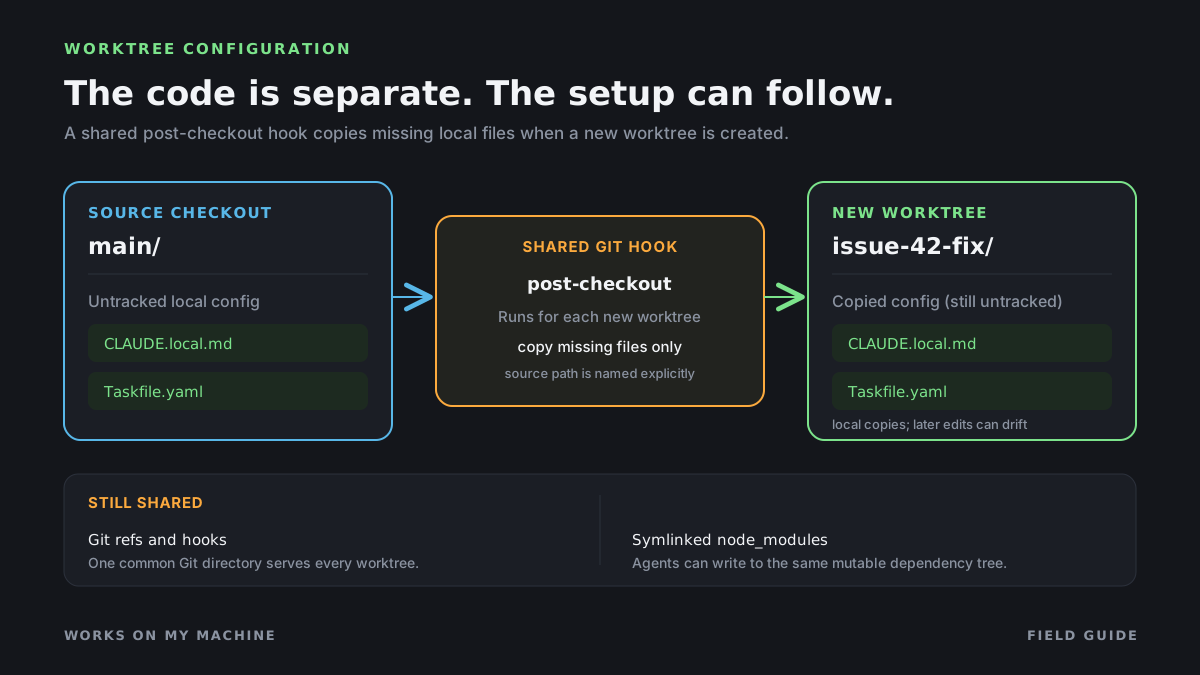
The result is that every new worktree behaves like a fresh clone, so the agent in issue-42-fix/ acts differently from the agent in main/. The code is the same. The config around the agent isn’t. It can lose the local rules in CLAUDE.local.md, and any local settings the other worktree’s agent had.
The fix: one post-checkout hook for every worktree
One hook can hand every new worktree its config. Git runs post-checkout after git worktree add too, not only after git checkout. Per the githooks docs, on worktree creation the first argument is the null ref, an all-zeros hash because there was no previous HEAD, and the third argument, the branch-checkout flag, is 1. The githooks page doesn’t say where a linked worktree finds the hook, but gitrepository-layout does: hooks come from the common git directory, the one .git all the worktrees share. I confirmed it in a scratch repo. So one hook covers every worktree I add.
Here’s the shape I use. It ignores file-level checkouts, never copies into the original checkout, and only copies files that are missing, so running it twice does nothing:
#!/usr/bin/env sh # .git/hooks/post-checkout — propagate untracked local config to new worktrees. # Copy-if-missing only: never overwrite a worktree's own local edits. [ "$3" = "1" ] || exit 0 # branch checkouts only, not file checkouts case "$1" in *[!0]*) exit 0 ;; esac # exit unless the previous HEAD is all zeros (a new worktree) # Name the source checkout explicitly; don't infer it from `git worktree list`. COMMON=$(git rev-parse --path-format=absolute --git-common-dir) || exit 0 ROOT=$(dirname "$COMMON") # the clone itself CURRENT=$(git rev-parse --show-toplevel) || exit 0 [ -n "$CURRENT" ] && [ -d "$ROOT" ] && [ "$CURRENT" != "$ROOT" ] || exit 0 # Drop .claude/settings.local.json if you only keep approvals in it (see the tools section). for file in CLAUDE.local.md Taskfile.yaml .claude/settings.local.json; do if [ -f "$ROOT/$file" ] && [ ! -e "$CURRENT/$file" ]; then mkdir -p "$(dirname "$CURRENT/$file")" cp "$ROOT/$file" "$CURRENT/$file" fi done
Two details matter. The null-ref guard is a deliberate tightening: without it, the hook also runs on every ordinary git checkout in an existing worktree, and it would bring back a file you deleted on purpose. And the hook copies rather than symlinks, so a worktree’s local edits stay its own. The trade-off is drift: edit the original later and existing worktrees keep the old copy.
Repos that use Husky
Husky was a nice discovery on one project I work on, but that setup is in the minority for what I do. Skip this section if you don’t use Husky. The pattern is still worth knowing.
Husky is a tool that manages git hooks inside a repo, so a local edit to .husky/post-checkout is really a change to a file everyone shares. The pattern I use instead is to commit the extension point and keep the behavior out of git:
# .husky/post-checkout — committed, shared with everyone # The script is gitignored, so a brand-new worktree doesn't have it yet. # Look in the source checkout instead. COMMON=$(git rev-parse --path-format=absolute --git-common-dir) || exit 0 LOCAL="$(dirname "$COMMON")/scripts/post-checkout-local.sh" # An explicit if exits 0 when the script is absent; `[ -f ... ] && ...` would exit 1 # and make a successful `git worktree add` look like it failed. if [ -f "$LOCAL" ]; then sh "$LOCAL" "$@"; fi
scripts/post-checkout-local.sh is gitignored and lives in the original checkout, which is where the hook looks for it. Without it the hook is a no-op that exits 0; with one, you get propagation. Because the shared hook runs a script from outside git, treat that file like code you’d review: anything that can write to it runs on every later checkout.
Husky 9 sets core.hooksPath to .husky/_, which contains generated, gitignored hook dispatchers. Git resolves that relative path from the root of the target worktree, where it runs post-checkout. A fresh worktree has no dispatcher, so post-checkout is skipped during git worktree add. Husky’s install step must run in the new worktree before later checkouts there can trigger the hook.
That’s a different job from the one Husky did in the Implicit Signals post. There, hooks gated the agent. Here, a hook hands each new worktree the agent’s scaffold.
What about dependencies?
My original hook also symlinked node_modules from the original checkout, to avoid duplicating gigabytes per branch. That’s fine while one agent works at a time. With several agents running, it means every worktree shares one mutable dependency tree, and two agents running npm install on different branches are writing into the same directory.
DoorDash hit the JVM version of this: in their multi-agent feature-flag cleanup, InfoQ reports they run up to four agents per repository in isolated worktrees, with Gradle’s daemon off so state doesn’t leak between them. A worktree gives you separate files. Anything that lives outside those files — a daemon, a cache, a symlinked directory — is still shared until you decide otherwise.
So I’d now install per worktree, with a package manager that keeps a shared content store (pnpm, for example) so that stays cheap. The same goes beyond Node. A Python project’s .venv is an untracked directory too, and each worktree needs its own. Environments hold absolute paths, so copying or symlinking one is fragile. Letting uv sync build a fresh one per worktree is cheap, because uv reuses its package cache.
Claude Code now has a built-in answer for the symlink half. Its settings reference lists worktree.symlinkDirectories, which links large directories such as node_modules into each worktree instead of duplicating them. It’s part of Claude Code’s own worktree creation, so I’d expect it only for worktrees Claude creates, and I haven’t tested that. The shared-mutable-tree hazard still applies to anything it links.
What the tools do for you now, and what they don’t
My experiment ran from November 2025 to April 2026, and the tools started shipping their own worktrees while it ran. Here is the order, with the sources I could check:
| Date | Tool | What shipped |
|---|---|---|
| 2025-10-29 | Cursor 2.0 | Parallel agents on git worktrees or remote machines |
| 2026-02-02 | Codex app | Built-in worktrees. I only found this date in press coverage, not on OpenAI’s own page |
| 2026-02-19 | Claude Code 2.1.49 | --worktree and subagent worktree isolation. The hooks WorktreeCreate and WorktreeRemove followed in 2.1.50 |
| Spring 2026 | Gemini CLI | Experimental --worktree behind a setting. I couldn’t pin the version |
| 2026-09 | Codex CLI | Managed worktrees merged Sept 2, on by default from v0.156.0 (Sept 22) |
So Cursor had already shipped when I built gwt-*, and the other tools arrived while I was using it. Codex’s CLI got managed worktrees four months after I closed the experiment.
Where they put worktrees differs, and that matters for permissions:
- Claude Code creates them under
<repo>/.claude/worktrees/<name>on aworktree-<name>branch. If Claude enters a worktree outside that folder, it asks for approval, and “don’t ask again” doesn’t suppress the prompt. A layout of peer or sibling folders, like mine, runs into that. - Codex keeps them outside the repo, under
$CODEX_HOME/worktrees, on a detached HEAD, and keeps the newest 15. - Gemini CLI uses
.gemini/worktrees/and doesn’t delete anything for you. - Cursor doesn’t document a location. Its cleanup caps worktrees at 25 per machine and, per its docs, can delete worktrees created outside Cursor, so I’d be careful opening a
gwt-issueworktree there.
None of them defaults to a sibling folder like the <repo>.worktrees/ one I use now.
Claude Code documents the most, so it gets the most space here. Per its worktree docs:
.worktreeincludecopies gitignored files that match its patterns, but only into worktrees Claude Code creates. Codex reads the same file, again only for worktrees its app creates. A plaingit worktree addfromgwt-issuedoesn’t get it from either.- Permission approvals are shared (v2.1.211). Choosing “Yes, and don’t ask again” for a Bash command in a worktree saves the rule to the main checkout’s
.claude/settings.local.json. It applies across every worktree of the repo, including ones made with plaingit worktree add. That’s also why copyingsettings.local.jsonin my hook can fork approvals the tool already shares. - Untracked skills, agents, and commands read through to the main checkout (skills need v2.1.277 or later) when the worktree has none of its own, however the worktree was created.
- Isolation is a different thing. Sessions started with
--worktree, or that enter one withEnterWorktree, get checks that block edits and git redirects aimed at the main checkout. A worktree I make withgit worktree addand then start Claude in doesn’t get those checks. It only gets the shared approvals and the read-through. - Hook paths don’t follow the worktree.
${CLAUDE_PROJECT_DIR}stays at the project root where the session started, while thecwdfield in the hook’s input moves with Claude. It’s an easy way to write a hook that checks the wrong tree. - The sandbox now blocks
git worktree add(v2.1.323, on macOS and Linux). A sandboxed Claude Code session can’t rungit worktree add,moveorremove, so if an agent runsgwt-issuefor you, that command has to run outside the sandbox.
That covers a lot, but not all of it. Shared approvals carry approval rules, and the read-through carries skills, agents, and commands. Neither carries CLAUDE.local.md. For sessions started from the desktop app, the docs say hooks and settings are read from the main checkout too. I haven’t tested whether that holds for CLI sessions started in a plain git worktree add worktree, so I’m not claiming it does. And none of it helps agents that aren’t Claude Code.
I wrote this hook before .worktreeinclude support existed. It was my way to carry local config into worktrees I created with git worktree add.
That’s why the hook still earns its place on my machine. You could put a cp in gwt-add and cover your own worktrees. But the tools’ fixes run when they create a worktree, and a cp in my function runs only when I do. A post-checkout hook runs for every worktree, whichever tool or command made it, including one an agent creates with a bare git worktree add.
Where I started: the .bare layout, and why I left it
Everything above assumes a plain git clone. That isn’t what I ran for most of the experiment, and the hook idea doesn’t depend on the layout.
My first attempt was a bare clone — a repository with no working tree of its own — with worktrees as sibling directories. On day two it broke my VS Code extensions: they couldn’t check out code or send commands to an assistant. I fell back to a normal clone with worktrees nested inside it, which worked fine for a while. Later I settled on a layout that hides the repository in .bare/ and makes every worktree a peer inside the project directory:
repo/ ├── .bare/ ← the actual git repository ├── .git ← one line: "gitdir: ./.bare" ├── main/ ← worktree: main branch ├── feature-xyz/ ← worktree: an agent on feature X └── issue-42-fix/ ← worktree: an agent on issue 42
The VS Code problem didn’t get fixed so much as it stopped mattering. As agents took over more of the execution, I spent less time in the IDE at all.
gwt-init, in my dotfiles, set this up. The steps that matter:
git clone --bare "$repo_url" "$dir_name/.bare" # repo into .bare/, project root stays clean echo "gitdir: ./.bare" > "$dir_name/.git" # lets git commands work from the project root git -C "$dir_name/.bare" config remote.origin.fetch \ "+refs/heads/*:refs/remotes/origin/*" # restore the normal fetch refspec git -C "$dir_name/.bare" fetch origin
The refspec line is the one I’d have missed. A bare clone doesn’t set up refs/remotes/origin/*, so without it git fetch updates nothing you can branch from, and every new worktree starts from a stale view of the remote.
There was one more trap. If you turn on extensions.worktreeConfig, the shared bare config still says core.bare = true, and that blocks work-tree operations in every worktree. The git-worktree docs warn that core.bare shouldn’t be shared when it’s true. Writing core.bare false into one worktree’s own config fixes only that worktree. The documented repair moves the setting into the per-worktree config for all of them: git -C .bare config --worktree core.bare true && git -C .bare config --unset core.bare.
The hook needs two changes in this layout: it lives in .bare/hooks/, and the source checkout is main/ rather than the repo root, so ROOT="$(dirname "$COMMON")/main". You also can’t find the source with git worktree list --porcelain | head -1. My first version did exactly that, and the git-worktree docs list the main worktree first. Here the main worktree is the bare repository itself, so ROOT resolved to .bare/, which has no CLAUDE.local.md, and the hook silently copied nothing. Skipping the bare entry doesn’t save you either: git sorts the rest by path, so in a scratch repo feat/ came out ahead of main/. Name the source; don’t infer it.
Why I left it
I no longer use the .bare layout. I hit several issues with how the AI tools resolved “the main checkout”, so I stopped using it, and I stopped using special cloning altogether. I run a plain git clone now.
The tools’ own docs show why that layout is fragile. Claude Code defines its sharing relative to the main checkout’s root: where approvals are saved, where project settings and skills are read through. Git’s own worktree list reports the bare repository as the main worktree, and in my layout the folder I thought of as the main checkout was just one peer among the others. Claude Code’s changelog shows bare layouts were still being fixed in October 2026: 2.1.299 through 2.1.305 changed the error for creating a worktree at a bare layout’s root and where new worktrees start from. I haven’t traced each of my issues to a specific one of these, so read that as context, not a diagnosis. With a plain clone, the main checkout is the directory I cloned, which is the case the docs describe.
My gwt-add function, which creates a worktree for a branch, tracked the change. In my dotfiles it grew from about 25 lines in November 2025 to 118 by early February, when it learned to find the shared git directory from anywhere and to file worktrees under <base>.worktrees/ folders. On March 3 it shrank to 47 lines and the folders went, about four weeks after they arrived. In July I dropped an older third layout and kept two: .bare and a normal clone, where worktrees go in a sibling <repo>.worktrees/ folder.
The plain clone also simplifies the hook. In a normal clone the shared git directory is <repo>/.git, so the source checkout is its parent, there’s no main/ to guess, and git worktree list --porcelain | head -1 returns the real checkout again because git’s first entry is the clone, not a bare repo. I ran the hook this way in a scratch repo, with worktrees in a sibling repo.worktrees/ folder. It copied CLAUDE.local.md into a new worktree, including when I created that worktree from inside another one.
Not everyone uses worktrees, and that’s fair
Boris Cherny and Simon Willison both skip worktrees. Per InfoQ, Cherny gives each local Claude Code session its own git checkout. Willison, as of his October 2025 post on parallel agents, hadn’t adopted worktrees yet and ran his agents in fresh checkouts instead.
A full checkout doesn’t share a hooks directory or an object store with the others, so one agent has less to break in another. It also has the same untracked-config gap, with no shared hook to fix it.
I think that’s a fair trade, made from the other side. Worktrees share the object store and the hooks on purpose — that’s what makes one post-checkout hook enough. It’s also why the next post has to deal with what happens when an agent runs a destructive git command against something shared.
Willison’s post says review is the natural bottleneck, and that he can only land one significant change at a time. I wrote about the machine I built for that half in Pencils Down Is a Review Process, Not a Vibe. Worktrees let the agents run in parallel. They didn’t make my review any faster.
Try it
Use a plain clone, write one post-checkout hook that copies your agent’s local config into new worktrees, and name the source checkout explicitly instead of inferring it from git worktree list. Then start one issue per worktree and watch which part of your day stops being “where was I?”
Next up in Part 2: the agents in those worktrees drive git through porcelain commands. Your guardrails should be written in plumbing.
Further reading
- git-worktree — per-worktree files,
extensions.worktreeConfig, and thecore.barewarning. - githooks: post-checkout — the three arguments, and why it runs on
git worktree add. - gitrepository-layout — why hooks come from the common git directory.
- Run parallel sessions with worktrees —
.worktreeinclude, shared approvals, and how hooks resolve paths inside a worktree. - Embracing the parallel coding agent lifestyle — Simon Willison’s checkout-per-agent counterpoint.