After three or four days of sustained use, the GitHub Copilot cloud agent was producing PRs that looked fine on the surface and fell apart the moment I read them.
The agent was not broken. The setup was.
I would assign it a GitHub issue, let it run for a while, watch it push a branch, open a PR, and announce it was done. The diff was there. The description looked reasonable. But the lint was off, the tests had never been run, and the acceptance criteria were implemented in a way that suggested the agent had never actually re-read them. The troubling part was not the bad code. It was the confidence. The agent was not signaling uncertainty. It was not asking for help. It was exiting the task having decided, on its own, that it was finished.
The cloud agent runs asynchronously in its own isolated environment. There is nobody for it to stop and ask, and it does not.
That was the pattern I needed to understand before anything else improved.
A cloud agent without a real feedback loop does not fail loudly. It exits with false confidence.
This post is about how I fixed it — not with better prompts, but by building the environment, tools, hooks, and signals that let the agent prove its own correctness before walking away.
The Real Problem Was Not the Prompt
When people talk about making cloud agents useful, the conversation almost always lands on the prompt. Better instructions, sharper system messages, more detailed acceptance criteria. Those matter, but they are not the bottleneck.
The bottleneck is this: the agent has no way to know when it is wrong.
A local developer closes the feedback loop without thinking about it. You run the tests. The linter flags you. The LSP underlines something red. CI catches what you missed. Every one of those signals is a check against reality. If you remove them, you are left with whatever story the developer is telling themselves about the code — and if that developer is a language model, the story is usually confident, coherent, and incorrect.
A cloud agent lives in that world by default. There is no IDE glowing at it. There is no teammate asking “did you run this?” There is no terminal in the corner with a failing test. Unless you build the signal, it does not exist.
The prompt tells the agent what to do. The feedback loop tells the agent whether it did it. Only one of those is optional.
The Four Layers That Made It Work
Before walking through them, here is the picture I wish I had on day one — how the environment and hooks plug into the agent’s actual loop:
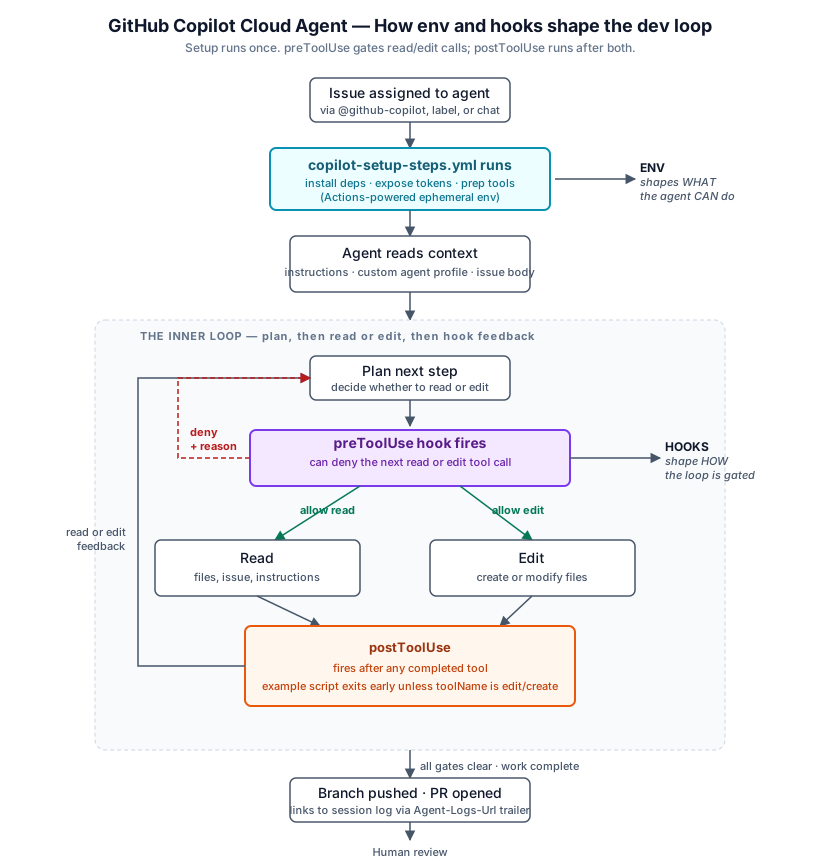
Setup runs once and decides what tools and tokens the agent has access to.
Inside the loop, preToolUse gates both Read and Edit, and both tools
feed into postToolUse even if the example script exits early for non-edit
tools.
Once I stopped trying to fix this with better prose in the instructions file, the setup started coming together. It is not a single configuration. It is a stack of layers that each give the agent something it was missing. My background with Docker images and devcontainers transferred almost directly here — the mental model is the same: build an environment where the tools, deps, and signals that make the work reviewable are available from the first second.
Here is the stack I landed on, roughly in order of how much each one changed the output.
1. Instructions, at the right granularity
GitHub Copilot’s repository instructions file — .github/copilot-instructions.md — is the obvious starting point, but it is not enough on its own. Repository-wide instructions tell the agent the general rules of the road, but they cannot capture the specifics that only matter in certain folders.
Path-specific custom instructions closed that gap. These live in .github/instructions/*.instructions.md, and each file’s YAML frontmatter uses an applyTo glob so the agent reads different guidance depending on where it’s editing. Frontend conventions are not service conventions. An integration surface plays by different rules than the core wiring underneath it. A senior engineer keeps these distinctions in their head; the agent will not, unless you put them in the file.
If your repo has meaningfully different zones (packages, plugins, apps, services), one flat instructions file is going to underperform. Split it. AGENTS.md is also supported if you prefer that convention.
2. A tools profile that says what the agent is for
The fastest way to underuse a custom agent is to give it everything.
That sounds backwards, because by default that is exactly what happens. Workspace custom agents are defined as Markdown files in .github/agents/*.agent.md with YAML frontmatter, and the tools property is optional. The behavior splits four ways:
- Omit
tools(or settools: ["*"]) — the agent gets every tool available, including every tool from every MCP server configured in the agent profile or at the repo level. tools: []— the agent gets no tools at all. The deliberate kill switch for a profile that reasons but does not act.tools: ["read", "edit", "search"]— only the listed tools are available, by alias or name.tools: ["read", "edit", "github/search-issues"]— same idea, but the namespace syntax (server-name/tool) lets you cherry-pick individual tools out of an MCP server instead of taking the whole bundle.
So scoping is not required. But it is one of the cheapest ways to make the agent measurably better, because a tool list is itself a form of instruction. A docs-fixer profile with tools: ["read", "edit", "search"] and no shell access is not just safer — it implicitly tells the agent your job here is to read and edit, not to run. The model plans inside that constraint. For me, focused profiles produced cleaner first-pass implementations than profiles with the full toolbox.
Two more reasons to scope deliberately:
- MCP bleed-through. Once MCP servers are configured at the repo level, omitting
toolsexposes every one of their tools to every agent profile. The namespace syntax lets you keep MCP power without handing every agent every key. - Reviewability. An explicit tool list tells a future teammate exactly what an agent can do. An omitted property tells them to go enumerate MCP servers to find out.
When I configured the profile deliberately, the quality jumped. The agent stopped guessing at things it could have simply checked, and stopped reaching for tools it had no business using on this kind of issue.
My rule of thumb: start with the default while you are learning what the agent needs, then tighten as you see which tools actually show up in the session logs. Treat the tool list the way you would treat IAM permissions: least privilege, audited over time.
3. An environment that mirrors local dev
The cloud agent needs the same thing I need on my laptop to do the work: the right Node version, Yarn, access to private packages, and whatever else the dev environment depends on. If any of those are missing, the agent hits a wall the moment it tries to install, build, or run anything — and because its feedback loop is weak, it often fails to surface that clearly. The PR just looks strange, and you have to read the logs to find out why.
GitHub exposes this as .github/workflows/copilot-setup-steps.yml — a special GitHub Actions workflow that runs before the agent starts, pre-installing tools and dependencies into the agent’s ephemeral Actions-powered environment. Treating that runtime as a dev environment — not a sandbox, not a REPL — changed how I thought about this. I was already good at building dev environments from the Docker and devcontainer era. The agent environment is the same problem, in the same shape, with the same tools.
Session logs made iteration tractable. You read the log, see what broke, fix the environment, try again. It took multiple passes to get right. That is normal.
A built-in MCP default worth knowing
The cloud agent auto-loads the GitHub MCP server, which sounds like it covers all your GitHub-side needs out of the box. It does not. The built-in token is specially scoped — per the official docs, it has read-only access to the current repository only. That default is easy to miss, especially in a public repo where it feels like read access should be enough for everything.
If the task needs data outside the current repository, you have to customize the built-in GitHub MCP server and give it a token with wider access. The docs walk through that flow and recommend storing the token as a copilot environment secret named COPILOT_MCP_GITHUB_PERSONAL_ACCESS_TOKEN.
The lesson, again, is the same as the rest of this post: the agent does not announce that an MCP call was constrained by scope — it just produces a worse result. The auth boundary is part of the feedback loop you have to build.
4. Hooks that encode the Definition of Done
If you take one thing from this post, take this: the hooks are the feedback loop.
Hooks are a real, official feature of the Copilot cloud agent. They live at .github/hooks/*.json and fire at specific points in the agent’s lifecycle — sessionStart, preToolUse, postToolUse, userPromptSubmitted, sessionEnd, and errorOccurred. The important distinction is that preToolUse is a hard gate, while postToolUse is an after-the-fact signal. preToolUse can deny a tool call before it runs. postToolUse runs after the tool completes, can inspect the result, and is useful for non-blocking validation and logging.
That split matters. Not every check should be a gate. Path restrictions, destructive command checks, and similar guardrails make sense in preToolUse. But checks like lint or test feedback usually make more sense after the agent has actually created or edited files.
I use hooks to codify a Definition of Done the agent has to satisfy before the work is considered complete:
- All linters pass
- All tests pass
- The CI-relevant operations run cleanly locally
- The acceptance criteria from the issue are reviewed, explicitly, against the diff
The last one matters more than it looks. The first three catch mechanical regressions. The last one is what keeps the agent honest about whether it actually built what was asked for, versus something adjacent that happens to compile.
What a hook actually looks like
Here is a minimal .github/hooks/validate.json that runs a validation script after tool completion. In this example, the script exits early unless the completed tool was edit or create:
{ "version": 1, "hooks": { "postToolUse": [ { "type": "command", "bash": "./scripts/validate-after-edit.sh", "timeoutSec": 60, "comment": "Run non-blocking validation after edits" } ] } }
The shape is different from preToolUse. Per the hooks reference, postToolUse receives the tool result after every tool execution, but its output is ignored — result modification is not currently supported. That makes it a good fit for validation, telemetry, and follow-up signals, not for vetoing the edit retroactively.
#!/usr/bin/env bash # scripts/validate-after-edit.sh INPUT=$(cat) TOOL_NAME=$(echo "$INPUT" | jq -r '.toolName') if [ "$TOOL_NAME" = "edit" ] || [ "$TOOL_NAME" = "create" ]; then if ! yarn lint --silent >/dev/null 2>&1; then echo "$(date): lint failed after $TOOL_NAME" >> .github/hooks/validation.log fi fi
So the distinction is: postToolUse fires after reads, edits, searches, and everything else, but this particular script only takes action after file mutations. The same pattern extends to the rest of the Definition of Done: run validation after create or edit, log or alert on failures, and reserve preToolUse for the checks that truly should block execution.
One nuance worth knowing: postToolUse still runs synchronously, so it does add latency to the loop, but it does not give you the same permission gate that preToolUse does. In practice, I think of them as two different layers: preToolUse for hard guardrails, postToolUse for non-blocking validation.
If you want the agent to truly react to a lint or test failure, the most reliable path is still to have it run lint and tests as normal tools after editing. Hooks are what let you shape when that happens, which checks are gates, and which ones are just signals.
The Hybrid Workflow That Emerged
Once the feedback loop was real, the division of labor between the cloud agent and me sorted itself out without any explicit planning. It came from just watching what worked.
The cloud agent turned out to be great at first-pass implementation on issues that are mechanically verifiable — the kind of work where the hooks can actually prove success. That is a broader set than I expected. Lots of tickets that used to feel like “small enough to do myself” are now cheaper to dispatch, because the agent can handle the implementation in parallel while I keep my local context pointed at something more interesting.
What stayed local was the judgment-heavy work: exploration, architecture decisions, finishing touches, and cases where the agent’s pattern was clearly wrong and I needed to replace it rather than refine it.
The rhythm per issue is now roughly:
- Cloud agent handles the first implementation pass
- I clone locally for refinement and smaller changes
- The agent’s output is the starting point, not the final answer
After proper configuration, the cycle is usually two to three iterations before the PR is approvable without major rework. That is a real number — not a demo number, not a best-case number. It includes the rework.
When the Agent Surprises You
One pattern I did not expect: the agent implementing something differently than I would is almost never a failure. It is a forcing function.
Two outcomes.
If the agent’s approach is better than the one I had in mind, I explore it locally with AI assistance, and if it holds up, I propagate the pattern to similar places in the codebase. That has happened more than once.
If the agent’s approach is wrong, I codify the correct approach in the Copilot instructions or in docs the agent can read next time. I discard the output and implement it locally, but the wrong implementation has already paid for itself — it just told me what to add to the instructions.
That is a feedback loop in the opposite direction. The agent’s mistakes improve the agent’s future constraints.
What You Actually Get From All This
Before this setup, implementation-heavy GitHub issues required a local context switch every time. Read the issue, switch branches, implement, run tests, push, open the PR. Each cycle is a real interruption to whatever higher-leverage work I was doing.
After this setup, that cycle runs asynchronously. The time I reclaim goes into the things the cloud agent cannot do well: design documents, architecture sketches, insight capture, and exploration sessions that need my local context anyway.
The cloud agent scales implementation bandwidth. My local context stays reserved for judgment.
I think that is what people actually mean when they say agents are going to reshape how engineers work. Not “the agent replaces you”, but “the agent takes the part of the work that is mechanically verifiable, and you keep the part that is not”. The hard configuration question is figuring out which is which — and you only figure that out once your feedback loop is strong enough to trust the agent’s output without re-reading every line.
One Honest Prerequisite
None of this was zero effort. The environment setup was tractable because I already knew what a working project dev environment needed, how to configure private package registry access, and how devcontainers are shaped. Someone without that background would find the same task opaque.
If that is you right now, that is fine — this is the layer worth investing in. Learning to configure agent environments is going to look, in a few years, the way learning Docker looked a decade ago. It is tedious. It is also the single biggest lever on whether your tools actually work.
The One-Line Version
If I had to compress everything I learned into one sentence, it would be this:
The prompt is the request. The feedback loop is the configuration. The agent can only be as reliable as the signals you give it.
Build the loop first. Then the prompt starts mattering.
Further Reading
Everything in this post maps to official GitHub documentation. If you want to go build the same setup:
- About GitHub Copilot cloud agent — overview of the ephemeral, Actions-powered dev environment.
- Adding repository custom instructions —
.github/copilot-instructions.mdand.github/instructions/*.instructions.md. - Copilot cloud agent supports
.instructions.md— path-specific instructions via theapplyToglob. - Creating custom agents for Copilot cloud agent and the custom agents configuration reference — agent profiles, YAML frontmatter, and the
toolsproperty. - Extending Copilot cloud agent with MCP — wiring in Model Context Protocol servers.
- Customizing the development environment —
.github/workflows/copilot-setup-steps.yml. - About hooks and hooks configuration reference —
sessionStart,preToolUse, and the rest, with deny-decision semantics for enforcing a Definition of Done. - Tracking Copilot cloud agent sessions and trace any cloud agent commit to its session logs — how to iterate on all of the above.